 MicPlot
Open MicPlot
MicPlot
Open MicPlot
Guides › Templates
Free mic plot and input list templates
Session paperwork you can download and use today: a dimensioned orchestral mic plot and stage plot as PDF, and an input list in Excel and CSV — blank, and filled in for a 30-channel symphony setup. Made in MicPlot from a real house setup.
Input list (Excel and CSV)
The same columns MicPlot prints: channel, source, microphone, preamp, gain, stand, height, position from the left and right edges, depth onstage, notes. Positions are as seen from the audience. The CSV opens in Numbers, Google Sheets and Excel; it also imports straight back into MicPlot (⬆ Load) with the positions kept.
- Blank input list — Excel (.xlsx)
48 numbered channels, header row frozen, filters on, prints landscape on one page width.
- Blank input list — CSV
The same columns as plain text, for Sheets, Numbers or your own tools.
- Example: symphony, 30 channels — Excel (.xlsx)
Mains and outriggers, string, wind, brass and percussion spots, harps and celesta, with models, preamps, gains, stands and heights.
- Example: symphony, 30 channels — CSV
Load it into MicPlot to see the mics on the stage.
What each column is for, and a channel order that holds up, is in the input list guide.
Mic plot (PDF)
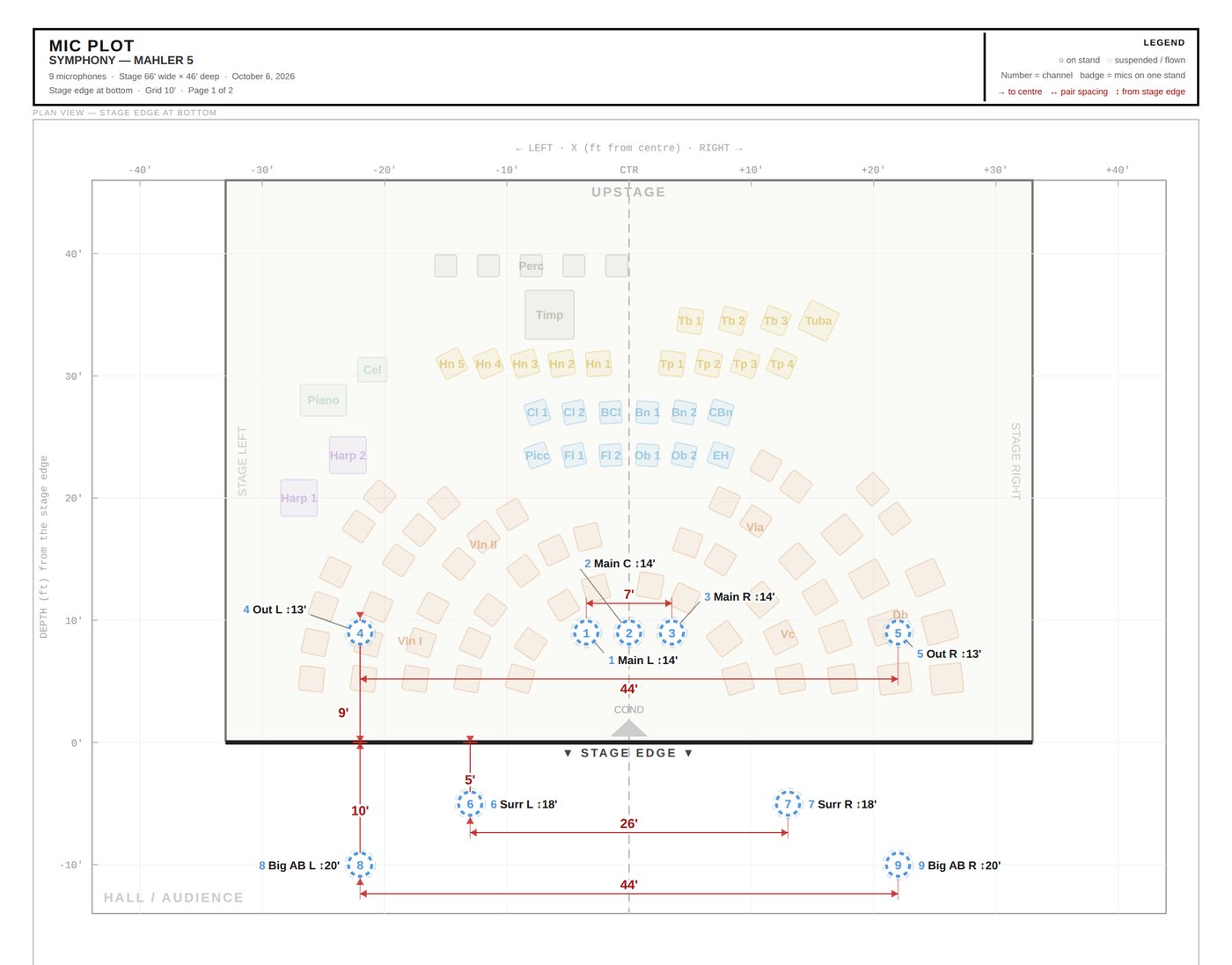
- Example mic plot — PDF, letter landscape
Page 1: the dimensioned plan. Page 2: the channel list. Page 3: stand-mounted spot mics measured to the centre line and the stage edge.
This is what a crew can rig from: every mic has a channel number, a distance from the stage edge and the centre line, a height, and whether it is on a stand or flown. The mic plot guide covers how to build one and what to leave off.
Stage plot (PDF)
- Example stage plot — PDF, letter landscape
American seating for a symphony orchestra: five string arcs, wind and brass risers, percussion, harps and keyboards, with the stage dimensions.
Orchestra operations and the hall set chairs and risers from this sheet before the microphones go in. The difference between the three sheets is spelled out in mic plot vs stage plot vs input list.
Using them
- Put your session name, the hall and the date in the header of every sheet, and a revision letter if you send more than one.
- Keep left and right as the audience sees them on every sheet. Never write "stage left" on a plot.
- Heights in the unit the crew measures in: feet and inches in most North American halls, metres elsewhere.
- These files are free to use for your own sessions and to pass to colleagues; the "Made with MicPlot" line in the footer is how other engineers find this page.
Questions engineers ask
What format is the mic plot template?
PDF, letter size landscape, printed from MicPlot: a dimensioned plan view, the channel list, and a spot-mic measurement page. To make your own, open MicPlot, load the symphony template and print — the layout is the same.
Is there an input list template for Excel?
Yes: a blank 48-channel .xlsx with the header row frozen and filters on, and a filled-in 30-channel symphony example. Both are also available as CSV.
Can I import the CSV into MicPlot?
Yes. Open MicPlot and use ⬆ Load, or paste the rows into the AI Import window\u2019s spreadsheet box. Channel, source, mic, stand, preamp, gain and height are read, and the edge and depth columns place the mics on the stage.
Can I use these for my own sessions?
Yes, freely, and you can share them with colleagues. The footer credit is the only thing we ask you keep.
Make your own in minutes
Every file on this page was printed from MicPlot. Open the symphony template, drag the mics to where yours go, and print a plot and input list with your session name on them — free, in the browser, no signup.
Open MicPlotRelated guides
- Orchestral input list template, with an example
The columns, a channel order that holds up, and a worked example for a full orchestra.
- How to make an orchestral mic plot
What goes on the plot, the order to build it in, and the mistakes that get a rig redone.
- Mic plot, stage plot, input list: what each sheet is for
Three sheets travel with every orchestral session, and the names get mixed up constantly — not least because theatre uses "mic plot" for…